> For the complete documentation index, see [llms.txt](https://framework.ishare.eu/llms.txt). Markdown versions of documentation pages are available by appending `.md` to page URLs; this page is available as [Markdown](https://framework.ishare.eu/version-3.0/detailed-descriptions/functional/primary-use-cases/3.-h2m-service-provision-with-identity-info-at-the-ip/h2m-with-verifiable-credentials.md).
# H2M with Verifiable Credentials
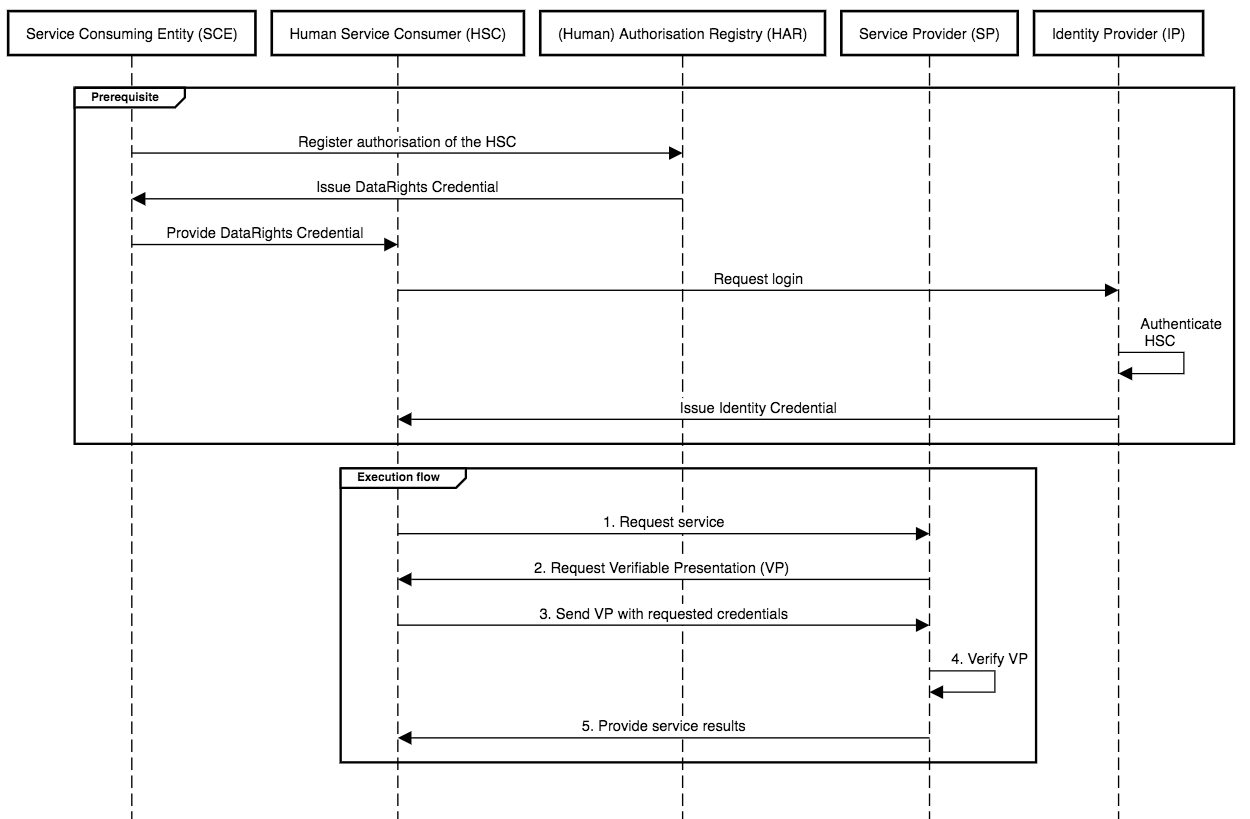
This subsection shows how the classic H2M sequences changes when using Verifiable Credentials (VCs). With VCs, the execution becomes a single, standard flow; the only difference from the classic variants is that identity information is carried in a Verifiable Presentation (VP) from the Human Service Consumer to the Service Provider. This Identity Credential is part of the prerequisites and is thus not included in the execution flow (no runtime Identity Provider or Identity Broker needed).
### **General prerequisites (VC):**
* The Human Service Consumer (HSC) holds an Identity VC in a wallet and can create a Verifiable Presentation (VP) upon request;
* The Service Provider (SP) can request and verify VPs (signatures, keys, issuer trust, credential schema, credential status/revocation, and validity window);
* Parties have been issued ParticipantCredentials by the Participant Registry during onboarding (evidence of iSHARE adherence);
* Parties can verify each other’s credentials upon request (to verify iSHARE adherence, revocation status, and trusted issuer lists when applicable).
{% hint style="info" %}
These credential verification checks (revocation status and whether the credential was issued by a trusted credential issuer) are assumed in every step, even if not explicitly described in the diagrams.
{% endhint %}
### **General Execution Flow**
1. Human Service Consumer requests service from Service Provider;
2. Service Provider requests Verifiable Presentation from Human Service Consumer;
3. Human Service Consumer sends the Verifiable Presentation with the requested credentials to Service Provider;
4. Service Provider verifies the Verifiable Presentation (iSHARE adherence, signature, keys, issuer trust, schema, revocation status, validity window);
5. SP provides service results to HSC.
{% hint style="info" %}
Steps 1–3 may be combined if the HSC includes a VP (with all required credentials) in the initial request.
{% endhint %}
### A) Without Identity Broker
**1) Authorisation via Identity Provider Checking Authorisation Registry (AR)**
* **Classic JWT :** Service Provider asks Identity Provider; Identity Provider checks Authorisation Registry; Identity Provider issues identity/authorisation token; Service Provider validates multiple tokens.
* **VC:** All Identity Provider and Authorisation Registry runtime calls disappear. Human Service Consumer presents **VP**; any credential required is **in the VP** (Identity and DataRights). Service Provider verifies once, then authorises.
**2) Authorisation via Identity Provider Providing an Authorisation Link to the Service Provider**
* **Classic JWT:** Identity Provider returns a link for Service Provider to fetch and verify.
* **VC:** Link is replaced by the **VP** from the Human Service Consumer. Service Provider verifies locally; no fetch-from-Identity Provider.
**3) Authorisation via Authorisation Registry Verifying Service Consumer using Participant Registry info**
* **Classic JWT:** SP/IdP/AR roundtrips, Authorisation Registry queries Participant Registry, then Service Provider validates.
* **VC:** Participant Registry checks are implicit via ParticipantCredential and issuer trust. Human Service Consumer’s **VP** carries the Identity and Participant credential; Service Provider verifies and applies policy, no Authorisation or Participant Registry runtime calls.
### Sequence Diagram
### B) With Identity Broker
{% hint style="info" %}
An **Identity Broker is not required** in the VC runtime. It is **OPTIONAL** and only relays the Verifiable Presentation request and response.
{% endhint %}
For scenarios **1–3**, the sequence diagram is identical to the broker-less flow; just replace the direct Service Provider ↔ Human Service Consumer exchange with Service Provider ↔ Identity Broker ↔ Human Service Consumer (no extra checks or tokens are added).
### Sequence Diagram
---
# Agent Instructions
This documentation is published with GitBook. GitBook is the documentation platform designed so that both humans and AI agents can read, navigate, and reason over technical content effectively. Learn more at gitbook.com.
## Querying This Documentation
If you need additional information that is not directly available in this page, you can query the documentation by asking a question.
Perform an HTTP GET request on the following URL with the `ask` and `goal` query parameters:
```
GET https://framework.ishare.eu/version-3.0/detailed-descriptions/functional/primary-use-cases/3.-h2m-service-provision-with-identity-info-at-the-ip/h2m-with-verifiable-credentials.md?ask=&goal=
```
`ask` is the immediate question: it should be specific, self-contained, and written in natural language.
`goal` is what the user is ultimately trying to achieve, the reason they need the answer. Sharing it helps GitBook give you a better, more relevant answer. A goal is most helpful when it describes the outcome the user wants rather than restating the question. For example, with `ask=how do I create an API token`, a goal like `automate deployments from our CI pipeline` lets GitBook tailor the answer to that use case.
The response will contain a direct answer to the question and relevant excerpts and sources from the documentation.
Use this mechanism when the answer is not explicitly present in the current page, you need clarification or additional context, or you want to retrieve related documentation sections.